
Let us get you 3 quotes
Compare and select the best Keyboard & Mouse
Compare Quotes

Find the right
Keyboard & Mouse in Darwin
Keyboard & Mouse in Darwin
Join industrial buyers comparing supplier quotes and buying with confidence. Free, quick and easy.

Compare quotes from expert Darwin Keyboard & Mouse suppliers like:




How IndustrySearch works
Tell us what you need
Answer a few quick questions about the equipment you're looking for.
Get personalised quotes
Receive tailored quotes from relevant Australian suppliers.
Compare and choose
Compare quotes, ask questions and choose the best option for you.
Looking to buy the best Keyboard & Mouse for sale in Darwin? Get Quotes sends your requirements to expert suppliers in Australia so you get personalised quotes to compare Keyboard & Mouse prices, specifications, features and terms then choose the one that’s right for you. Also compare servicing, consumables and reviews, so you can buy with confidence.
 Save time
 Compare quotes
 Buy with confidence
Save time, compare quotes & buy with confidence
Keyboard, Keypad & Mouse Suppliers in Darwin
Updated Dec 04, 2025
Metromatics | Computing, Technology and Embedded solutions
Customers: Raytheon Australia, BAE Systems, Boeing Australia, QR, Transgrid, Snowy Hydro, SAAB, ASC
Metromatics is an Keyboard & Mouse supplier to All
Metromatics Pty Ltd is an Australian-owned engineering and technology company specialising in the design, manufacture, integration and supply of rugged computing, embedded electronics and industrial technology solutions for demanding applications across Australia and New Zealand. Established in 1989, Metromatics provides engineering expertise and complete technology solutions ...Customers: Raytheon Australia, BAE Systems, Boeing Australia, QR, Transgrid, Snowy Hydro, SAAB, ASC
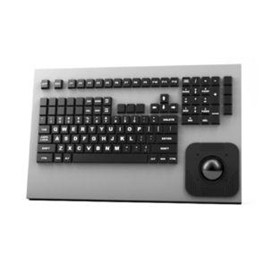
Cortron Rugged Keyboards
Cortron Keyboards meet a variety of applications and rugged environmental conditions. Available in compact styles for tight spaces or as full ...

Cortron Rugged Keypads
Require a few function keys or a standard number pad? Cortron Keypads are part of an installation with keyboard, pointing device or stand ...
ESIS | Industrial Electronic Equipment
Customers: NBN Co, ASC, Saab, Wormald, Datacom, Powerlink, Source Energy, Dept of Defence, L&H, MMEM
ESIS is an Keyboard & Mouse supplier to All
Esis is an expert industrial electronic equipment supplier, based in Sydney, Australia since 1971. Need to spec or purchase industrial technology? Our engineers give you expert advice to find the best solution for your requirements. We have a deep knowledge across a huge range of products well and we're familiar with diverse industry applications. After purchase you can ...Customers: NBN Co, ASC, Saab, Wormald, Datacom, Powerlink, Source Energy, Dept of Defence, L&H, MMEM

Esis Waterproof Wireless Mouse | CSM502
A wireless laser mouse, rugged and IP68 resistant against waterproof, Antibacterial and washable, made of silicone, Auto sync, 10 meter, 2.4GHz ...

CyberVisuell Waterproof Keyboards with Pointer - Silicone CSK301
The Silicone CSK301 Industrial Waterproof Keyboard with Pointer is rugged and features 102 keys with numeric keypad and mouse-button pointing ...

APC Technology | Rugged Mobile Solutions and Computer Displays
APC Technology is an Keyboard & Mouse supplier to All
Since 1984, APC Technology has led the way in ruggedised hardware, developing technology that is built to survive the impact of the elements. Whether it’s shock, vibration, water, dust, g-forces, or anything nature throws at you, we can develop a technology solution to help get your work done. Our constantly improving, end-to-end design, manufacture and sustainment processes ...
APC Intrinsically Safe Keyboard IP65 | KBIM2-IS
Designed and manufactured by APC Technology, our range of IECEx certified solutions are designed for use in intrinsically safe and hazardous ...

iKey Backlit Military Keyboard IP68
The iKey backlit military keyboard exceeds NEMA 4X requirements and is fully-submersible, meeting IP68 specifications.

POS Central | POS Hardware, POS Software, and POS Supplies
POS Central is an Keyboard & Mouse supplier to All
POS Central is an Australian leading point of sales supplier. It is a central point or main center where the sale of all types of POS system takes place. Get Best and Affordable deals on Pos Bundles, Cash Registers, Cash Drawer, Receipt Printers, Label Printers, Barcode scanners and more.

Keyboard & Mouse
Keyboard & Mouse
What type of keyboard and mouse should I buy?
When choosing a keyboard and mouse, it's important to consider what you'll be using them for. If you're a gamer, you may want a mechanical keyboard with programmable keys and a high DPI gaming mouse. If you're a writer, you may prefer a quieter keyboard with a comfortable layout and a mouse with a high precision sensor.
Are wireless or wired keyboards and mice better?
Wireless keyboards and mice offer greater flexibility and convenience as they don't have cords that can get in the way or limit movement. They are also easier to set up and use, as there are no cables to connect.
- On the other hand, wired keyboards and mice are more reliable and offer a more stable connection, as they are not affected by interference. They also don't require batteries, so you don't have to worry about replacing them. However, they may be less convenient to use as they are tethered to your computer and may limit your movement.
What is the difference between a gaming keyboard and a regular keyboard?
These features may include:
- Mechanical key switches: Unlike regular keyboards, gaming keyboards often use mechanical switches, which provide a tactile and audible feedback when a key is pressed. This makes it easier for gamers to know when a key has been pressed, which can be important in fast-paced games.
- Backlighting: Many gaming keyboards have backlighting, which can be customized to different colors and patterns. This can help gamers see the keys in low-light conditions and can also add to the aesthetics of the keyboard.
- Programmable keys: Some gaming keyboards have programmable keys, which can be customized to perform different functions or macros. This can be useful for gamers who want to streamline their gameplay and perform complex actions with a single keypress.
- Anti-ghosting: Gaming keyboards often have anti-ghosting technology, which allows multiple keys to be pressed simultaneously without any key presses being missed. This is important in games where multiple keys may need to be pressed at the same time.
- Durability: Gaming keyboards are often built to be more durable than regular keyboards, with features such as reinforced key switches and braided cables.
Can I use a keyboard and mouse with my laptop or tablet?
Yes, you can use a keyboard and mouse with your laptop or tablet. Most laptops and tablets have USB or Bluetooth ports that allow you to connect a keyboard and mouse. You can also use wireless keyboards and mice that connect via Bluetooth or a wireless USB dongle. Some tablets may require an adapter or special cable to connect a keyboard or mouse.
What is the average lifespan of a keyboard and mouse?
The average lifespan of a keyboard and mouse can vary depending on several factors, including usage frequency, quality of materials, and maintenance. Higher quality, more expensive keyboards and mice can potentially last longer, up to 10 years or more with proper care. It is also important to note that spills, drops, and other accidents can significantly decrease the lifespan of a keyboard and mouse.
How many keys should a keyboard have for optimal use?
Ultimately, the optimal number of keys for a keyboard depends on the individual's needs and preferences.
What is the DPI for a mouse and does it matter?
DPI (dots per inch) refers to the sensitivity of a mouse. It is a measure of how many pixels the mouse moves on the screen for every inch it travels on the mouse pad. A higher DPI means that the mouse will be more precise and accurate, allowing for faster and more precise movements.
- It depends on the individual's needs and preferences. For example, gamers may prefer a higher DPI for faster and more precise movements in-game, while graphic designers may prefer a lower DPI for more accurate and controlled movements when working on detailed designs.
How do I clean and maintain my keyboard and mouse?
Cleaning and maintaining your keyboard and mouse is essential to ensure their longevity and performance. Here are some tips:
- Turn off your computer and unplug your keyboard and mouse before cleaning them.
- Use a can of compressed air to blow out any dust or debris from between the keys or buttons.
- Use a soft, damp cloth or sponge to wipe down the keys, buttons, and exterior of the keyboard and mouse.
- Avoid using harsh chemicals, such as bleach or ammonia, as they can damage the surface of the keyboard and mouse.
- For stubborn stains or grime, use a small amount of rubbing alcohol on a cloth or cotton swab to gently clean the affected area.
- To maintain your keyboard and mouse, avoid eating or drinking near them, and keep them out of direct sunlight.
- Regularly check and replace the batteries in your wireless mouse, and clean the underside with a soft cloth or cotton swab.
What is the price range for a good quality keyboard and mouse?
The price range for a good quality keyboard and mouse can vary depending on the brand, features, and quality. Generally, you can find a decent keyboard and mouse set for around $20 to $50. It ultimately depends on your budget and specific needs.
What is the return policy for keyboards and mice?
The return policy for keyboards and mice may vary depending on the retailer or manufacturer. Some may have a 30-day return policy for a full refund, while others may have a longer or shorter time frame. It is important to check the return policy of the specific product or retailer before making a purchase. Some retailers may require that the product be unopened and in its original packaging, while others may accept returns for products that have been used but are still in good condition. It is also important to note that some retailers may charge a restocking fee for returns.
Get 3+ Quotes Now - Compare prices, availability and quality. It’s free, quick and secure.
Back to top
Keyboard & Mouse Costs and Supplier Insights
The listed price of a Keyboard & Mouse for sale ranges from $50 to $300, averaging $175.
If you are looking to buy a Keyboard & Mouse for sale, suppliers on IndustrySearch include ESIS, Metromatics
Use Get Quotes to receive personalised prices and proposals from trusted suppliers with top reviews and excellent service.
Buy a Keyboard & Mouse Near Me
Save time and delivery costs while getting fast support, by contacting Keyboard & Mouse suppliers near you.

Are you a Keyboard & Mouse supplier?
 Reach valuable industrial buyers in minutes
 Promote key products & content
 Drive cost effective & measurable sales
learn more
Reach valuable industrial buyers in minutes
Promote key products & content
Drive cost effective & measurable sales