
Let us get you 3 quotes
Compare and select the best Industrial Joystick & Trackball
Compare Quotes

Find the right
Industrial Joystick & Trackball in Brisbane
Industrial Joystick & Trackball in Brisbane
Join industrial buyers comparing supplier quotes and buying with confidence. Free, quick and easy.
How IndustrySearch works
Tell us what you need
Answer a few quick questions about the equipment you're looking for.
Get personalised quotes
Receive tailored quotes from relevant Australian suppliers.
Compare and choose
Compare quotes, ask questions and choose the best option for you.
Looking to buy the best Industrial Joystick & Trackball for sale in Brisbane? Get Quotes sends your requirements to expert suppliers in Australia so you get personalised quotes to compare Industrial Joystick & Trackball prices, specifications, features and terms then choose the one that’s right for you. Also compare servicing, consumables and reviews, so you can buy with confidence.
 Save time
 Compare quotes
 Buy with confidence
Save time, compare quotes & buy with confidence
Industrial Joystick & Trackball Suppliers in Brisbane
Supplier location
Brand

ESIS | Industrial Electronic Equipment
Customers: NBN Co, ASC, Saab, Wormald, Datacom, Powerlink, Source Energy, Dept of Defence, L&H, MMEM
ESIS is an Industrial Joystick & Trackball supplier to All
Esis is an expert industrial electronic equipment supplier, based in Sydney, Australia since 1971. Need to spec or purchase industrial technology? Our engineers give you expert advice to find the best solution for your requirements. We have a deep knowledge across a huge range of products well and we're familiar with diverse industry applications. After purchase you can ...Customers: NBN Co, ASC, Saab, Wormald, Datacom, Powerlink, Source Energy, Dept of Defence, L&H, MMEM

Industrial Joystick | A-IM2
A-IM2 Joystick – which emulates a mouse, unaffected by dust or water, IP65, 125x160mm Uses opto-strain gauge sensing technology. The joystick ...

ITAC Systems Industrial Trackball | MOUSE-TRAK
The ITAC Systems Professional Desk Top (PDT) trackball controller is a high-durability computer control and pointing device manufactured with ...

APC Technology | Rugged Mobile Solutions and Computer Displays
APC Technology is an Industrial Joystick & Trackball supplier to All
Since 1984, APC Technology has led the way in ruggedised hardware, developing technology that is built to survive the impact of the elements. Whether it’s shock, vibration, water, dust, g-forces, or anything nature throws at you, we can develop a technology solution to help get your work done. Our constantly improving, end-to-end design, manufacture and sustainment processes ...
Cursor Controls Optical Trackballs IP68 | X50 Series
The X50 Series optical Trackerball™ is an extremely high specification, contact-less device, ideal for demanding cursor control applications. ...
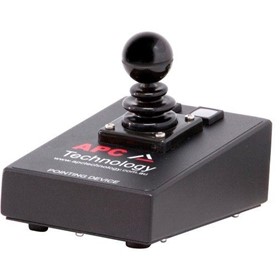
APC Industrial Joystick IP65
The PCIM industrial mouse is an inductive joystick that emulates a mouse. The mouse cursor speed is proportional to displacement of the joystick ...

Industrial Joystick & Trackball
Industrial Joystick & Trackball
What is the difference between a joystick and a trackball?
A joystick is a device used to control movement in video games or other applications. It typically consists of a stick that can be moved in different directions to control movement on screen. A trackball, on the other hand, is a device used to control the movement of a cursor on a computer screen. It typically consists of a ball that can be rolled in different directions to move the cursor. The main difference between the two is that a joystick is used for controlling movement in games, while a trackball is used for controlling the movement of a cursor on a computer screen.
What types of industrial applications are joysticks and trackballs commonly used for?
Joysticks and trackballs are commonly used in industrial applications such as robotics, manufacturing, aerospace, and military. They are used for controlling machinery, navigating computer systems, and operating vehicles and aircraft. Joysticks are often used in remote control systems for cranes, excavators, and other heavy machinery, while trackballs are used in control panels for industrial automation systems. They are also used in military and aerospace applications for controlling drones, missiles, and other unmanned vehicles.
What are the key factors to consider when selecting an industrial joystick or trackball?
When selecting an industrial joystick or trackball, there are several key factors to consider:
- Durability: Industrial joysticks and trackballs need to be able to withstand harsh environments and heavy use. Look for products that are made from high-quality materials and have a rugged design.
- Precision: The joystick or trackball should be able to provide precise control over the equipment it is operating. Look for products that have a high level of accuracy and sensitivity.
- Ergonomics: The joystick or trackball should be comfortable to use for extended periods of time. Look for products that have an ergonomic design and are easy to grip.
- Compatibility: Ensure that the joystick or trackball is compatible with the equipment it will be used with. Check for compatibility with the operating system, software, and hardware.
- Customization: Some industrial joysticks and trackballs can be customized to meet specific needs. Look for products that offer customization options such as button mapping, sensitivity adjustments, and programmable buttons.
What are the different types of joystick and trackball interfaces available?
There are several types of joystick and trackball interfaces available, including:
- USB: This is the most common interface used for joysticks and trackballs. It is a plug-and-play interface that is compatible with most modern computers.
- PS/2: This interface is an older technology that is still used for some joysticks and trackballs. It requires a dedicated port on the computer and may require additional drivers to work properly.
- Bluetooth: Some joysticks and trackballs are designed to work with Bluetooth-enabled devices. This interface allows for wireless connectivity and is commonly used with gaming consoles and mobile devices.
- Serial: This interface is an older technology that is rarely used for joysticks and trackballs. It requires a dedicated serial port on the computer and may require additional drivers to work properly.
- Gameport: This interface is an older technology that was commonly used for joysticks and other gaming peripherals. It requires a dedicated gameport on the computer and may require additional drivers to work properly.
What is the typical lifespan of an industrial joystick or trackball?
However, the lifespan of these devices can vary depending on several factors such as the quality of the materials used, frequency of use, maintenance, and environmental conditions. It is recommended to consult the manufacturer's specifications or contact them directly for more information on the lifespan of their products.
How do I know if a joystick or trackball is compatible with my existing equipment?
To know if a joystick or trackball is compatible with your existing equipment, you need to check the following:
- Compatibility with operating system: Check if the joystick or trackball is compatible with your operating system. Most devices are compatible with Windows, Mac, and Linux.
- Connection type: Check the connection type of the joystick or trackball. Some devices use USB, while others use Bluetooth or wireless connections. Make sure your computer has the necessary ports or adapters to connect the device.
- Drivers: Check if the device requires drivers to be installed. Most devices come with drivers that need to be installed before they can be used. Make sure your computer meets the minimum system requirements for the drivers.
- Button mapping: Check if the buttons on the joystick or trackball can be mapped to the functions you need. Some devices have programmable buttons that can be customized to your needs.
- Compatibility with games or software: Check if the joystick or trackball is compatible with the games or software you want to use it with. Some devices are designed for specific games or software and may not work with others.
What are the most important safety features to look for in an industrial joystick or trackball?
The most important safety features to look for in an industrial joystick or trackball include:
- Emergency stop button: This feature allows the operator to quickly stop the machine in case of an emergency.
- Lockout/tagout: This feature ensures that the machine is properly locked out and tagged out before maintenance or repair work is performed.
- IP rating: The IP rating indicates the level of protection against dust and water ingress. A higher IP rating means better protection.
- Durability: The joystick or trackball should be able to withstand harsh industrial environments and repeated use.
- Ergonomics: The joystick or trackball should be designed for comfortable and safe use, reducing the risk of repetitive strain injuries.
- Fail-safe operation: The joystick or trackball should have fail-safe operation to prevent unintended movements or actions.
- Anti-vibration: The joystick or trackball should be designed to reduce vibration and provide stable operation.
Can industrial joysticks and trackballs be customized to meet specific requirements?
Yes, industrial joysticks and trackballs can be customized to meet specific requirements. Manufacturers offer a range of customization options, including the number and type of buttons, the size and shape of the joystick or trackball, the type of connection, and the materials used in construction. Customization can also include programming the joystick or trackball to perform specific functions or to work with specific software or equipment.
What is the typical lead time for ordering an industrial joystick or trackball?
However, lead times for ordering industrial joysticks or trackballs can vary depending on the manufacturer, the type of product, and the quantity ordered. It is recommended to contact the manufacturer directly for specific lead time information.
What is the warranty period for an industrial joystick or trackball and what does it cover?
However, in general, the warranty period for an industrial joystick or trackball can vary depending on the manufacturer and the specific product. Some manufacturers offer warranties ranging from 1 year to 3 years or more. The warranty typically covers defects in materials and workmanship, but may not cover damage caused by misuse or accidents. It's important to read the specific warranty information provided by the manufacturer to understand what is covered and for how long.
Get 3+ Quotes Now - Compare prices, availability and quality. It’s free, quick and secure.
Back to top
Industrial Joystick & Trackball Costs and Supplier Insights
The listed price of an Industrial Joystick & Trackball for sale ranges from $150 to $1,200, averaging $675.
If you are looking to buy an Industrial Joystick & Trackball for sale, suppliers on IndustrySearch include ESIS
Use Get Quotes to receive personalised prices and proposals from trusted suppliers with top reviews and excellent service.
Buy a Industrial Joystick & Trackball Near Me
Save time and delivery costs while getting fast support, by contacting Industrial Joystick & Trackball suppliers near you.
Industrial Joystick & Trackball for sale in Melbourne
Industrial Joystick & Trackball for sale in Sydney
Industrial Joystick & Trackball for sale in Perth
Industrial Joystick & Trackball for sale in Hobart
Industrial Joystick & Trackball for sale in Brisbane
Industrial Joystick & Trackball for sale in Adelaide
Industrial Joystick & Trackball for sale in Darwin

Are you an Industrial Joystick & Trackball supplier?
 Reach valuable industrial buyers in minutes
 Promote key products & content
 Drive cost effective & measurable sales
learn more
Reach valuable industrial buyers in minutes
Promote key products & content
Drive cost effective & measurable sales